Modern laptops keep trading ports for thinness, which means a single USB-C port now has to stand in for HDMI, Ethernet, an SD card slot, and a charger all at once. A good USB-C hub solves that trade-off, but the right pick depends on how many ports you actually need, what resolution your external monitor runs at, and how much power has to pass through to keep your laptop charged while everything else is plugged in. Based on published specs and buyer feedback trends across major retailers, the hubs below were chosen for port variety, charging pass-through wattage, display support, and build quality, covering both budget-conscious users and anyone who wants a near-desktop setup from a single cable.
Anker 555 USB-C Hub (8-in-1)
The Anker 555 is one of the most widely recommended all-around hubs for a reason: it packs eight functions into a compact, 4.5-ounce body without the price climbing into premium territory. It includes a 4K@60Hz HDMI port, two USB-A data ports and one USB-C data port rated at 10Gbps, a Gigabit Ethernet port, and both SD and microSD card slots. The USB-C input accepts up to 100W and passes through up to 85W to the host laptop, so a single compatible charger can power the hub and keep a laptop topped up at the same time.
This hub is best suited to people who want one dock for everyday use at a desk or on the go, rather than a dual-monitor workstation — it only drives a single external display, and the HDMI port is the sole video-out option (the USB-C port is data-only). The built-in cable is fixed rather than detachable, which keeps the design tidy but means it can’t be swapped if it wears out. For the price, it remains a go-to pick for Windows and Mac laptops alike.
UGREEN Revodok Pro 109 (9-in-1 USB-C Hub)
The Revodok Pro 109 is UGREEN’s answer for buyers who want more ports than the Anker 555 without stepping up to a full docking station. It offers nine total connections: two USB-C 3.2 ports at 10Gbps, a 10Gbps USB-A port, a second USB-A port at 5Gbps, a 100W USB-C Power Delivery input, 4K@60Hz HDMI, Gigabit Ethernet, and SD plus microSD card readers. Up to 85W can pass through to charge the connected laptop, matching the Anker on power delivery while adding an extra data port.
Its aluminum-alloy casing gives it a sturdier, more dock-like feel than many plastic hubs in the same price range, and it connects via an integrated USB-C cable rather than a short pigtail. Like most hubs in this class, the USB-A and secondary USB-C ports handle data only — they don’t output video or charge connected accessories. It’s a strong fit for anyone who regularly juggles external drives, a wired network connection, and a card reader in addition to a monitor.
Satechi USB-C Slim Multiport Adapter V2
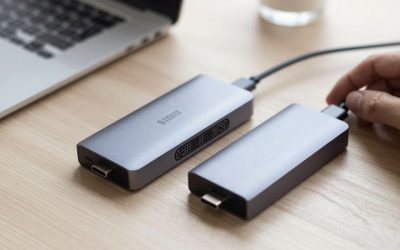
Satechi’s Slim Multiport Adapter V2 targets users who want a pocketable hub rather than a desk-bound dock. It’s built around a single 4K@60Hz HDMI port, a USB-C PD passthrough that accepts up to 100W and outputs up to 75W to the laptop, a 10Gbps USB-A 3.2 port, a secondary USB-A 2.0 port, and microSD/SD card readers in Satechi’s signature brushed-aluminum finish. The compact footprint makes it easy to leave permanently clipped to a laptop sleeve or stashed in a bag side pocket.
Because it skips Ethernet in favor of a smaller, lighter shell, it’s a better match for MacBook and ultrabook owners who mainly need a monitor connection, a couple of accessories, and a memory card reader while traveling than for a fixed desk setup. The anodized aluminum body is a common reason buyers cite for choosing Satechi over plastic alternatives, since it matches MacBook finishes and tends to hold up well to daily bag use.
Satechi USB-C Multiport Adapter V2 (8-in-1 with Ethernet)
For buyers who like the Satechi build quality but need more connectivity than the Slim model offers, the brand’s 8-in-1 Multiport Adapter V2 adds Gigabit Ethernet, a 4K@60Hz HDMI port, three USB-A ports, SD and microSD readers, and a USB-C PD input rated up to 115W. That higher wattage ceiling gives it some headroom for power-hungry laptops that need more than the 85W many competing hubs cap out at.
The extra ports and Ethernet jack come with a slightly larger, heavier shell than the Slim V2, which makes it a better fit for a stationary desk setup than for daily carry. It’s aimed at users who want wired networking reliability — useful for video calls or large file transfers where Wi-Fi can be inconsistent — alongside the display and card-reading features already common across Satechi’s lineup.
Choosing between these comes down to how you work: the Anker 555 is the safest all-around pick for most people, the UGREEN Revodok Pro 109 edges it out on port count and build for a similar price, and the two Satechi models suit buyers who prioritize a premium aluminum finish — the Slim V2 for portability, or the 8-in-1 V2 when Ethernet and higher charging wattage matter more than pocketability. Matching the hub’s charging wattage and display resolution to your actual laptop and monitor will prevent the most common buyer’s-remorse issues with this category.








Write Your Review
No reviews yet. Be the first to share your experience!